

AI notetaker and workspace
Turning better meetings into greater work.
Introducing Olive. A helping hand for project managers and teams, across every project and client. It helps you prepare, assists you live and turns meetings into:
- Summaries
- Tasks
- Knowledge
Before · the agenda
Outcomes to reach
Agree the prototype scope
Confirm the field test date
During · the transcript
RecordingIngrid
Then remote updates move to the next release.
Sara
I’ll update the scope and send it for sign-off by Friday.
Jonas
I’ll update the test plan to match.
Ingrid
And I’ll book the security review with Acme Corp.
Mads
Does the field test date still hold?
Sara
It should. Let’s confirm it under the next item.
Jonas
The test users ask for offline mode more than anything else.
Mads
We can build it for prototype 2, but not next to remote updates.
Sara
How long would remote updates take on their own?
Mads
Three weeks, with the security review.
Ingrid
Then I’d rather go to the field test with offline mode.
Jonas
Agreed. It is what the users are waiting for.
After · what came out of it
Send the updated scope
Book the security review
Project requirements updated
More than an AI notetaker. A shared workspace where Olive helps you before, during and after. Meeting after meeting.
Before
Olive helps you prepare
An agenda and the outcomes to reach, drafted for you from what was said last time.
After
Olive helps you follow through
What you agreed becomes tasks, and the open ones return on your next agenda.
Over time
Olive helps you remember
Every meeting, decision and file for a client or project, in one place you can ask.
This is Olive. A desktop app for macOS, Windows and Linux.


The app shown is a prototype and subject to change.
Part one
Better meetings.
Prepare each meeting and stay on track. Olive takes the notes while you talk.
01 · Prepare
Describe the meeting. Get the agenda.
Olive asks a few questions about the meeting, then drafts the context, the agenda and the outcome goals from your previous meetings.
Features
- Outcomes, not just topics
- Open tasks carried over
- Built on earlier meetings
- A draft you can change
02 · Meet
Focus on the conversation.
Olive takes everyone’s notes. Key decisions and tasks are highlighted and extracted, so tasks get done and decisions reach your knowledge base.
Features
- Every speaker named
- Decisions and tasks flagged
- An agenda that ticks itself off
- In person or on calls
Part two
Greater work.
Every meeting leaves tasks to do and knowledge to keep. Olive makes sure neither gets lost.
03 · Follow through
What was agreed will get done.
The summary and the tasks are ready right after the meeting. Once approved, they are sent straight to your team and the tools they already use.
Features
- You approve first
- Sent straight to your team
- One task list for the team
- Every outcome achieved or open
04 · Remember
Ask the project anything.
Every meeting and file adds to what Olive knows about a client or project. Ask it anything, and get an answer with its sources.
Features
- Answers from context, with sources
- A brief Olive keeps current
- Reports and documents on request
- Files and documents add context
In-person meetings too. In the conference room or over coffee, Olive listens through Leaf, its recorder, or through the app on your phone.
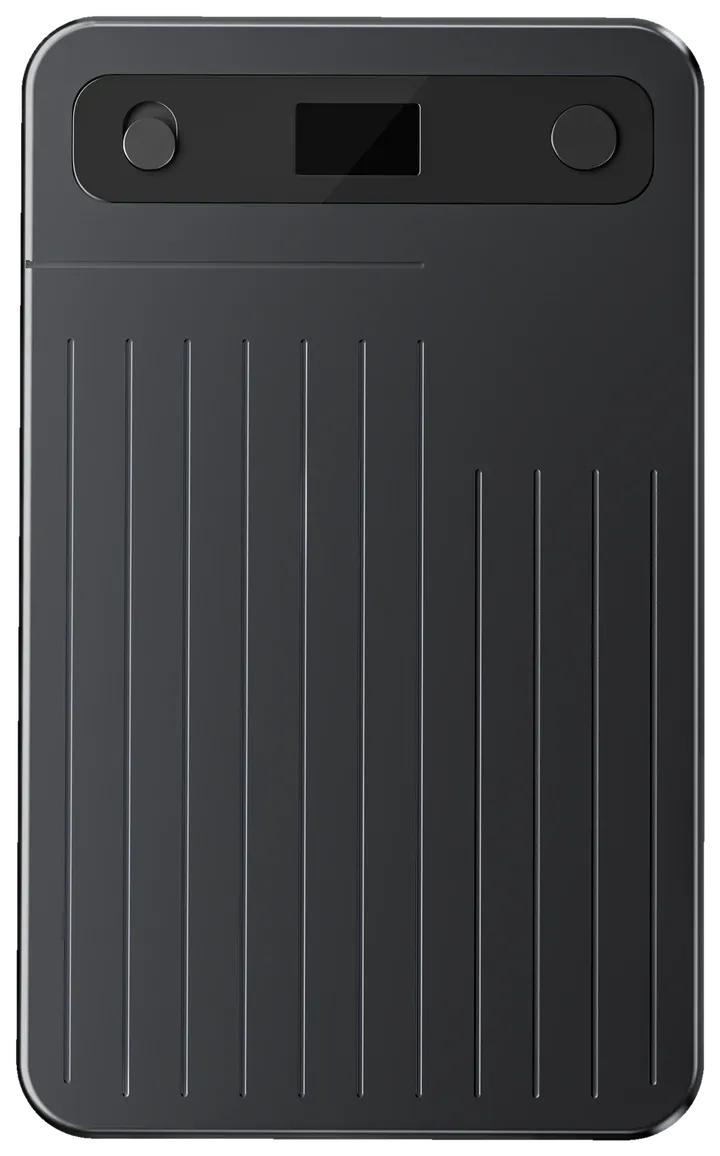


Leaf on the table
Olive’s recorder. Put it on the table and it hears the whole room.
Phone calls
It snaps to the back of your phone and records both sides.
Your phone stays free
Follow the live agenda and take photos while Leaf records.
Record with your phone
You can use the app to record in-person meetings with your phone instead of Leaf.
Fits the way your team already works. Olive joins the calls you have, sends tasks to the tools you use and keeps your meetings yours.
Teams
Shared by the whole team
Everyone on a client or project works from the same record.
Not one person’s notes
Most notetakers keep notes for one person or one meeting.
One shared space
Per client or project, with its meetings, tasks and knowledge together.
Your own projects too
Olive works when you work alone as well.
Tools
Meetings
 Google Meet
 Microsoft Teams
 Zoom
On any other platform, the desktop app records the call.
Calendar
 Google Calendar
 Outlook
Tasks
 Jira
 Microsoft Planner
 Linear


 And more.
Knowledge
 Confluence
 OneNote
 Notion


 And more.
Integrations may be limited during beta testing.
Privacy
Stored in the EU
Stored and processed in the EU, under GDPR.
Never used to train AI
Not by us, and not by our AI providers.
Everyone knows Olive is there
Olive joins calls as a named participant. In person, you start when everyone agrees, and Leaf shows a light while it records.
You decide who sees what
Invite a client, share with a guest, or delete a meeting and everything from it.
Who we are
Built by people who have seen the problem first hand. A team of Danish engineers who have worked alongside the product teams and consultants Olive is made for.
- 10+ years
- building tech products
- 300,000+ people
- have used what we built

Questions
What teams ask first.
Who is Olive for?
Teams whose work moves forward through recurring meetings: product teams, consultancies, agencies and anyone running client or project work. It works for your own projects too.
How is this different from the notetaker I already have?
Most notetakers work for one meeting or one person. Olive is shared by the whole team on a client or project. It also helps you prepare each meeting and turns what was agreed into tasks you approve.
How does Olive join my meetings?
Connect Google Calendar or Outlook, and Olive joins your Google Meet, Teams and Zoom calls on its own. On any other platform, the desktop app records the call from your computer’s audio. For in-person meetings, record with Leaf or with the Olive app on your phone. Leaf records phone calls too.
What do my clients see?
Clients you invite into a space see its meetings, summaries and tasks. Anyone else is a guest and sees only what you share with them.
Which languages does Olive understand?
Danish, English, German, Dutch, French and Spanish, even when people switch language mid-meeting.
Where is our data stored, and can I delete it?
In the EU, encrypted in transit and at rest, and never used to train AI models. You can delete a meeting at any time, with its recording, its transcript and everything that came from it.
What will it cost?
Pricing isn’t set yet. Olive is still in development, and people on the waitlist hear first.
Early access
Turning better meetings into greater work.
Olive is still in development. Join the waitlist and be among the first to try it.
Join the waitlist